 saferow
saferow mcp
Claude Code asks, saferow decides.
Point Claude Code, Cursor or Codex at saferow instead of at a database password. They get six tools and the same Safety Kernel as saferow’s own agent: reads are safe reads, changes are counted and held for you, and every applied change lands in the ledger. A client can propose. It can never approve.
| Tool | What it does |
|---|---|
list_connections | The connections you shared with this client, by name. Never a host, a user or a password. |
describe_schema | Tables, columns and keys of one connection. |
run_query | A safe read: 100 rows by default, at most 1,000, within 20 seconds. Values in personal columns come back withheld. |
explain_query | The database’s plan for a query, without running it. |
propose_change | One to 50 statements, with a title and a reason. The kernel dry-runs and counts them, and answers: held for approval. Pro. |
ledger_status | Whether a proposal was approved, rejected or expired, and the recent changes. |
set up
One switch per client.
In saferow, open Settings › Integrations and turn on Claude Code, Cursor or Codex. saferow adds its one entry to that client’s config file, keeps a backup beside it, and touches nothing else in the file. This is what it writes:
"mcpServers": {
  "saferow": {
    "type": "stdio",
    "command": "/Applications/saferow.app/Contents/MacOS/saferow-mcp",
    "args": []
  }
}[mcp_servers.saferow]
command = "/Applications/saferow.app/Contents/MacOS/saferow-mcp"
args = []No token and no password in either file. The command is a small binary inside saferow, signed with it.
pairing
You see who is asking, once.
- The client starts saferow-mcp. It holds no logic and no secrets: it pipes to a socket inside saferow’s own folder, readable only by you. No network port is opened.
- saferow checks the caller. Only saferow’s own signed shim may connect, and saferow notes which app started it and who signed that app.
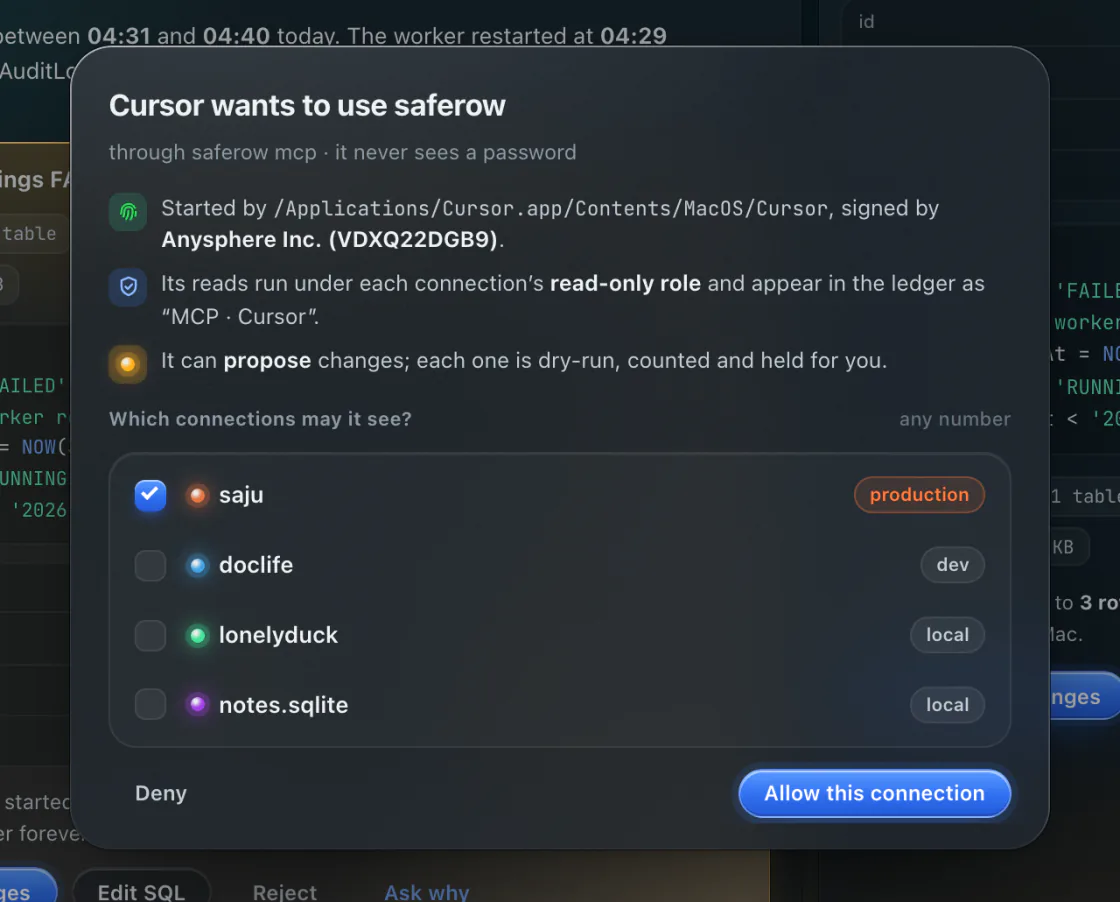
- You pair it. A sheet names the client and asks which connections it may see. Until you answer, every tool says it is waiting for you.
- It works within what you chose. One connection, reads only, on the free tier; proposals on every connection with Pro. A connection whose agent access is off is invisible to it.
the limits
What a client can never do.
-
Approve
Approving is a capability only saferow’s main process holds. A proposal waits for you in saferow, with Touch ID on production, like the agent’s own.
-
See a password
Connections are names. Passwords stay in your Keychain, and the client never learns a host or a user.
-
Take rows off the Mac you kept on it
A client counts as off the Mac. Personal columns come back withheld, and a connection set to keep rows on this Mac refuses it.
Unpair a client in Settings › Integrations and it is cut off. Its changes appear in the ledger as “MCP · Claude Code”, or whichever client it was, and its reads in Mission control’s Today. The help guide covers each client step by step.
others
MCP is everywhere now. The gate is what differs.
Most database clients ship an MCP server in 2026. What they promise about writes, in their own words, as of 3 October 2026:
| Client | In its own documentation |
|---|---|
| Sequel Ace | Built in since 5.3.0, local only, read-only by default with a switch to allow writes; no token or per-call approval is documented. (source) |
| TablePro | Sixteen tools; the client gets a scoped token. Levels Ask, Edit and Agent; destructive operations need a typed confirmation every time. (source) |
| DataGrip | execute_sql_query takes any SQL; for read-only access JetBrains says to use a database user with restricted privileges. (source) |