Public beta · coming soon
 saferow, an AI database workspace for macOS
An AI database workspace. Ask in plain words, see the work, approve the change, undo it later. On your model, on your Mac.
A complete MySQL, MariaDB, Postgres and SQLite client that fully replaces Sequel Ace and TablePro, with an agent as the front door and a Safety Kernel under both.
- macOS 13 or later
- Free tier, forever
- Pro $24 once
- No account, no telemetry

What saferow promises
-
The front door
Ask anything
The agent plans, reads, charts, explains and drafts fixes and migrations across MySQL, MariaDB, Postgres and SQLite. The full classic client is one keystroke away, and the agent writes into the same screens.
-
The product
Run nothing blind
Reads run under a read-only role and never ask. Writes are dry-run, counted, held for one approval — Touch ID on production — and can be rewound. Claude Code, Cursor and Codex get the same rules through saferow mcp.
-
The brain
Your model, your Mac
Local by default, picked from scores measured on a Mac: Qwen 3.6 35B-A3B as the agent, Granite 4 7B-A1B for fast SQL, Granite 4.2 8B for decisions, Granite 4.1 built in. Claude, GPT or OpenRouter when you choose them. Every turn shows what left the Mac.
the agent
One turn, from your question to the ledger.
You ask in plain words. saferow restates it, plans, reads, shows its working and proposes the change. Every step is on screen, and nothing writes until you say so.
-
Scope line
Above the input: which database, which environment, which role, which model, and where it runs. A wrong connection is caught before you press Return.
-
Echo
In under a second, one line restates what you asked and where, so a misread is caught before anything runs.
-
Plan
For multi-step work or anything that writes. Each step is R or W, with its tables and an estimated row count. A plan that only reads runs without asking.
-
Tool rows
Each query is a ruled row, open while it runs and folded after. Open one to read the SQL, edit it and run it; SQL you edit is marked as yours.
-
Result
A grid or a chart under a header made of numbers. One click opens it in the canvas or a tab of the classic client.
-
Proposed change
The SQL, a dry run inside a transaction that is rolled back, and before and after for the rows. The agent’s reasoning is labelled as agent-written.
-
Held
The button becomes Approve 3 changes. The approval is bound to the 3 counted rows: if the count differs when it runs, it rolls back. On production, Touch ID repeats the count and the connection.
-
Ledger
Every write — yours, the agent’s, an MCP client’s — lands in one ledger with its count, how it was approved, and a way back.
Trouble comes with its way out
- Count changed · rolled back · Review
- Schema changed since the plan · Re-plan
- Rewind conflicts · Review

the moment of consent
One approval, bound to the rows it counted.
The sheet names who is asking, then puts the count, the way back and the transaction rule in a few lines before the fingerprint.
- 3Counted with the same WHERE. If the count differs when it runs, the transaction rolls back and nothing changes.
- Saved first, on this Mac. A restore point before the write, so Rewind can put the rows back.
- Plain Return never approves. Touch ID does, or ⌘⇧A and then Touch ID.
the safety kernel
The kernel decides. The model never does.
One table, enforced in saferow’s database worker for you, the agent and every MCP client alike. An agent’s approval hooks only draw the interface; this table is the decision.
| Action | Local or dev | Production | Tagged personal data |
|---|---|---|---|
| Read, under the read-only role | Runs | Runs | Runs on a local modelor sends schema only |
| Write up to 1,000 rows | Runsrestore point first | HeldTouch ID | HeldTouch ID |
| Larger write or schema change | Held | HeldTouch IDdry run on a shadow copy first | Held |
| Write proposed through saferow mcp | Held | HeldTouch ID | HeldTouch ID |
| DROP, TRUNCATE, DELETE without WHERE | Helduntil you type the count | Refused for agentsyou can still run it yourself | Refused for agents |
-
Reads never ask
They run under a read-only database role, so the database itself refuses a write, whatever the SQL text looks like.
-
One statement at a time
Several statements in one string, and code hidden in a MySQL
/*! … */comment, are refused before the database sees them. -
Plans, not prompts
An agent’s write plan is held once, even on dev. People rejected 39% of plans while approving 97% of single prompts: the plan is where attention works.
the everything app
Complete without the agent. Better with it.
Some people will never open the agent, so the classic client stands on its own. The agent is the best reason to switch. Safety sits under both, and it is free.

-
Classic client
freeReplaces Sequel Ace and TablePro.
- MySQL, MariaDB, Postgres and SQLite in one native-feeling app.
- SSH through your own system ssh:
~/.ssh/config, ProxyJump and the 1Password agent just work. - A fast grid with staged edits, committed with ⌘S through the same kernel.
- A SQL editor with completion, formatting and
:params. - Structure, indexes, relations and DDL for every table.
- Visual EXPLAIN, and a relationship map in each database’s Tour.
- Export results as CSV, JSON or SQL.
- Import your connections from Sequel Ace, TablePlus and TablePro. Passwords are never read from them.
-
Agent
free to look · Pro to act- Ask, explain, chart and search every table.
- Plans with R and W steps and row estimates.
- Tool rows with editable SQL.
@tablementions;/fix,/migrate,/index,/chart,/watch.
- Fixes, migrations and bulk changes, each held for approval.
- Split compare: one question, two models side by side.
-
Safety
always free- Read-only roles, single statements, counted writes.
- Approvals bound to row counts.
- Dry runs; shadow copies for schema changes on production.
- Rewind: 7 days free, 30 days with Pro.
- One ledger of every write, by you, the agent or an MCP client.
- What left the Mac, shown on every turn.
-
Memory & automation
Pro- Per-database memory: definitions, joins, notes.
- Saved questions you can rerun.
- Playbooks for repeat work.
- Watches that report only trouble, under the read-only role.
- Write proposals from Claude Code, Cursor and Codex.
-
Models
free- A built-in runtime: no Ollama needed.
- Ollama and LM Studio, detected.
- OpenRouter sign-in, or your own Anthropic or OpenAI key.
- Roles: agent, careful, fast SQL, decisions, embeddings.
- Fit checked before a download; speed and a SQL self-check measured on your Mac.


keys
Everything is a keystroke away.
- ⌘K
- Go anywhere, switch connections, approve what is held.
- ⌘J
- Ask the agent, from any screen.
- ⌘1 ⌘2
- The agent, or the classic client.
- ⌘L
- The ledger.
- ⌘⇧A
- Approve the held change, then Touch ID.
- ⌘S
- Commit your staged grid edits, through the same kernel.
models
Chosen by measured scores, not leaderboards.
saferow’s own benchmark: 32 SQL questions in one shot and as an agent that finds the tables itself, and 101 decisions on intent, personal data, injection and writes. Eleven local models, one Mac.
measured on an M4 Max, 2026-09-30
-
agent
Qwen 3.6 35B-A3B
28/32 as an agent
The top agent score with no malformed tool calls, at mixture-of-experts speed.
- One shot
- 30/32
- Writes
- 99 tok/s
- Memory
- 22.5 GB
- Needs
- 32 GB Mac
-
fast sql
Granite 4 7B-A1B
28/32 in one shot
Right SQL in under a second, and small enough for an 8 GB Mac.
- As an agent
- 20/32
- Writes
- 115 tok/s
- Memory
- 4.6 GB
-
decisions
Granite 4.2 8B
97% of 101 decisions
Routes each question and flags personal data, injection and writes, 160 ms each. It never decides what is safe; the kernel does.
- Memory
- 8.3 GB
- Runs via
- its own wrapper or Ollama
-
built in
Granite 4.1 8B
25/32 as an agent
Runs inside saferow with no Ollama, with clean tool calls, and fits in 16 GB.
- One shot
- 26/32
- Writes
- 65 tok/s
- Download
- 5.3 GB
| Mac memory | Agent | Careful | Fast SQL | Decisions |
|---|---|---|---|---|
| 48 GB or more | Qwen 3.6 35B-A3B | Qwen 3.8 27B | Granite 4 7B-A1B | Granite 4.2 8B |
| 32 GB | Qwen 3.6 35B-A3B | Granite 4.1 8B | Granite 4 7B-A1B | Granite 4.1 3B |
| 16 GB | Qwen 3.5 9B | Granite 4.1 8B | Granite 4 7B-A1B | Granite 4.1 3B |
| 8 GB | Qwen 3.5 4B | Qwen 3.5 4B | Granite 4.1 3B | Granite 4.1 3B |
Remote, when you choose it
Claude, GPT and hundreds more through your OpenRouter account, or your own Anthropic or OpenAI key. saferow never resells tokens, and every turn says how many bytes left the Mac.
Lock a connection to this Mac
Mark a connection local-only and the kernel refuses to send its rows to any model off the Mac, so an agent can’t switch models to get around it.
A small test: 32 questions on a synthetic database, one run each at temperature 0, so one question moves a score by 3 points. saferow measures each model’s speed on your own Mac after first use.
saferow mcp
Claude Code asks, saferow decides.
Point Claude Code, Cursor or Codex at saferow instead of at a database password. They get six tools and the same kernel: reads under the read-only role, writes held for you, every statement in the ledger.
- Claude Code starts saferow-mcp, a small signed binary inside the app. The first time, saferow asks you to pair it and which connections it may see.
- Reads run under the read-only role and appear in the ledger as “MCP · Claude Code”.
- It calls
propose_change. The kernel counts and dry-runs the change, then answers: held. - You review it in saferow and approve; on production, with Touch ID.
- It reads the outcome from
ledger_status. The password never left saferow.
"mcpServers": {
  "saferow": {
    "type": "stdio",
    "command": "/Applications/saferow.app/Contents/MacOS/saferow-mcp"
  }
}
Settings › saferow mcp writes this for you after you confirm, with a backup beside the file.
- list_connections
- describe_schema
- run_query
- explain_query
- propose_change
- ledger_status
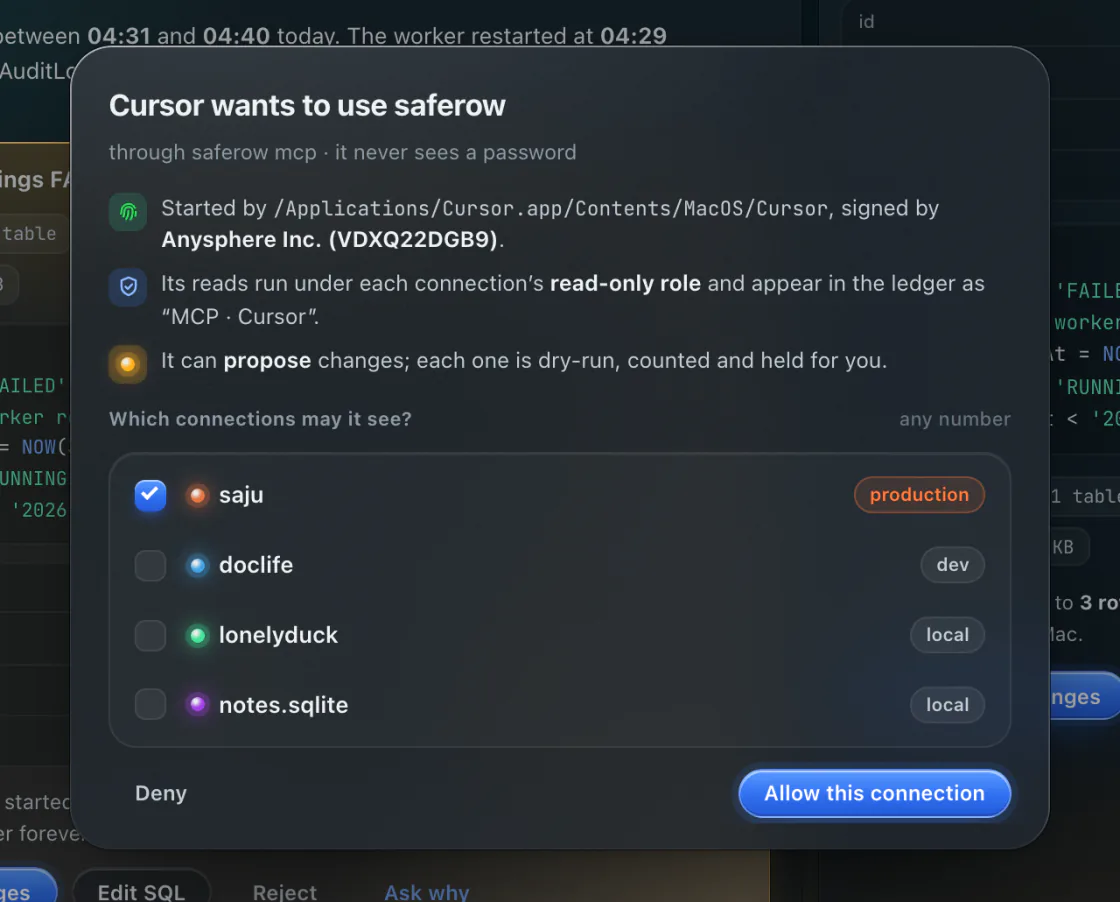
Free: read-only MCP on one connection. Pro: write proposals on every connection.
pricing
Safety is never paywalled.
The classic client and every safety feature are free, forever, for commercial use too. Pro is one payment, no subscription.
-
Free
forever$0
The full classic client, the Safety Kernel, 7-day Rewind, a read-only agent, and read-only MCP on one connection.
-
Pro
once$24once · 3 Macs$19 at launch
Agent writes, 30-day Rewind, memory, watches, playbooks, compare, MCP writes and unlimited connections. Every 1.x update free.
questions
Asked before you asked.
When can I get it?
The public beta is coming soon. There is no download yet. Email hello@saferow.app and you will hear when it opens.
Is saferow open source?
No, saferow is closed source. Instead of asking you to read its code, it gives you checks you run yourself: the read-only role is a GRANT you can see with SHOW GRANTS, the 12 escape tests run against your own database from Settings › Safety, and every host the app talks to is listed for Little Snitch. How to verify it.
Does my data leave my Mac?
Not with a local model: the schema, the rows and your questions stay on the Mac. With a remote model you choose, what it needs goes to that provider, and every turn shows how many bytes left the Mac. A connection can be locked to local models. There is no telemetry and no account. Privacy.
Which Mac do I need?
macOS 13 Ventura or later; builds for Apple silicon and Intel are planned. For local models, 16 GB of memory or more is recommended. An 8 GB Mac runs the small models, or you can use a remote one. System notes.
Can the agent drop my production table?
No. DROP, TRUNCATE and DELETE without WHERE are refused for agents on production and on personal data. You can still run them yourself in a SQL tab: they are held until you type the row count, and on production you confirm with Touch ID.
Does it really replace Sequel Ace and TablePro?
That is the aim: the classic client is complete without the agent, for MySQL, MariaDB, Postgres and SQLite, with your own ssh. saferow imports your saved connections from Sequel Ace, TablePlus and TablePro; you add the passwords, which go to your Keychain.
Is there a subscription?
No. Pro is $24 once ($19 at launch) for 3 Macs, with every 1.x update free. Licenses are checked offline, and there is no account. Pricing.
Windows or Linux?
Not now. saferow is built around the Mac: Touch ID for approvals, the Keychain for passwords, the system ssh, and local models on Apple’s chips.
Public beta · coming soon
Ask your database. Undo anything.
One email when the beta opens, and nothing else.